


Toca Boca World
Toca Boca
I approached Toca Boca World less like a conventional game and more like a digital playroom. There is no single route I need to follow, no score I have to chase, and no fixed solution waiting at the end of every activity. Instead, I can create characters, arrange scenes, visit locations, and build small stories at my own pace. That makes it especially interesting for families deciding between an open-ended creative game and a more structured educational app.
My overall impression is positive, but it depends heavily on what you want from a game. If a child enjoys pretending, dressing characters, moving objects around, and inventing conversations, this offers a generous space for that kind of play. If the goal is spelling practice, arithmetic drills, or a clearly measured learning path, I would choose a different type of app. Its educational value comes through imagination, decision-making, and storytelling rather than lessons presented as lessons.
What to consider before choosing it
The first decision is whether your child needs direction or freedom. Toca Boca World is made by Toca Boca and belongs to the educational side of mobile games, yet it does not behave like a digital workbook. I found the experience strongest when I allowed myself to explore without expecting instructions at every step. The game invites experimentation, and much of the enjoyment comes from discovering what can be combined or rearranged.
Related News

Block Blast!: The Puzzle Game Reflecting Our Digital Lives

How Matchington Mansion Thrives with New Android and iOS Updates

Piano Star: The Music Game Revolutionizing Mobile Engagement
That freedom is also the reason some children may need an adult introduction. A younger player might open the game and wonder what to do first because there is not one obvious mission that explains the whole experience. I would spend a few minutes exploring together, showing how to create a character, enter a place, and move items. After that, many children can continue independently, although the amount of independence will vary with age and familiarity with touch controls.
The game is free to start and carries an Everyone content rating, which makes it easy to try as a family. It has reached over 100 million installs, and its average rating is 4.3 from around 6.5 million ratings. Those figures suggest a very broad audience, but they do not remove the need to check whether open-ended play suits a particular child. Popularity is not the same as a perfect fit.
Related News

Why WhatsApp Messenger Still Makes Everyday Communication Feel Easy

Jurassic World: The Game Is the Better Dino Tycoon for Strategic Players

Threads in Real Life: Who Should Join, Lurk, or Leave

How SHEIN Turned Shopping Into an Endless Content Feed

How to Make Fortnite Feel Smarter on Mobile

Should You Switch to Microsoft Outlook on Mobile?
I would judge it using four practical questions. Does the child enjoy making up stories? Can they handle a play space with many choices? Are you comfortable reviewing optional purchases together? And do you want creative play, structured learning, or a mixture of both? The answers matter more than the download decision itself.
How the play space feels in everyday use
In use, I found the game easy to understand once I stopped looking for a traditional beginning and end. Characters can be customized, locations can become stages, and ordinary objects can support surprisingly different stories. A room can become a home, a shop, a classroom, or the setting for an argument between two invented characters. The appeal lies in the fact that I decide what an object means in the current scene.
One realistic use is a short after-school wind-down. A child could create a character, prepare a pretend meal, move between locations, and act out a story about getting ready for the next day. That activity does not require winning or losing, so it can be calmer than a fast action game. I also see value in using it as a prompt for conversation: I can ask why a character is visiting a place, what happened earlier, or how the story should end.
Gallery
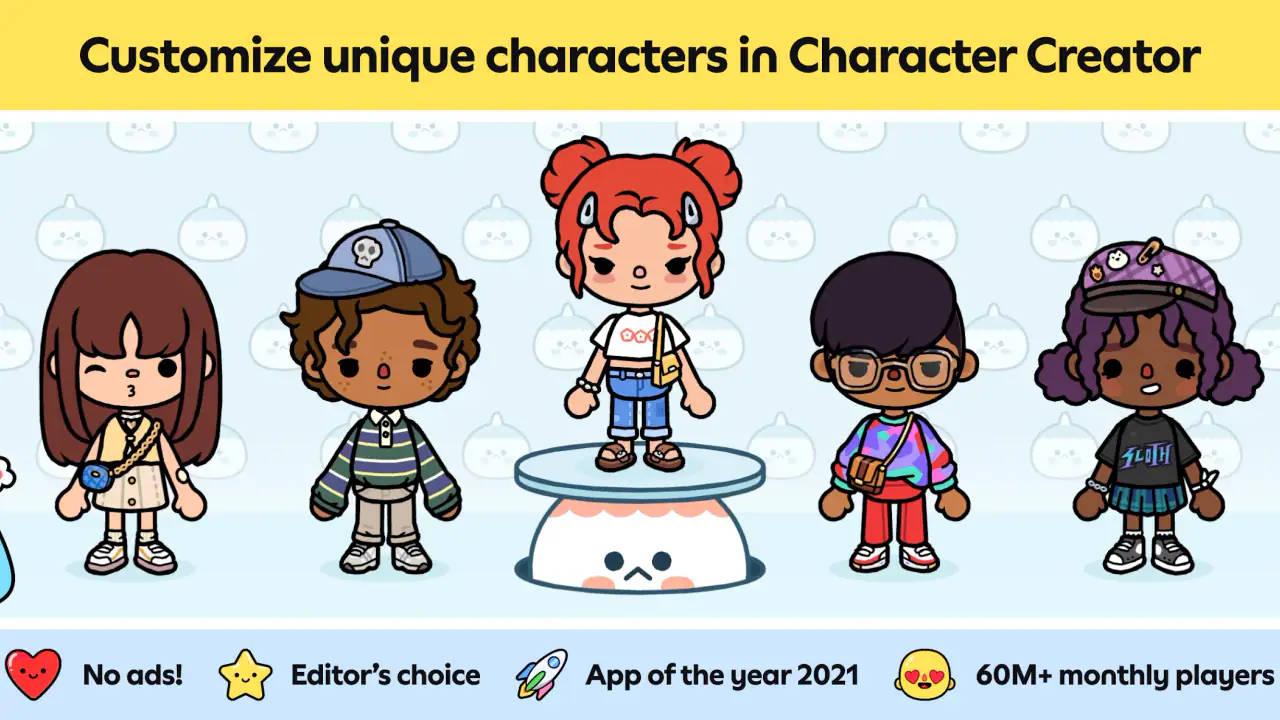
Another useful routine is collaborative play. One person can arrange the setting while another invents the dialogue. This works better than simply handing over the device because it turns the screen into a shared storytelling tool. I noticed that children who initially seemed unsure often became more engaged when an adult offered a simple prompt instead of taking control of the whole scene.
Why customization matters more than it first appears
The customization is not only cosmetic. Choosing a character’s appearance gives children an immediate sense that the world belongs to them, while changing the setting helps them move from passive viewing to active creation. I found that this can encourage longer conversations than a game built around repeated taps, because the child has to explain what the characters are doing and why.
A helpful approach is to create a small cast rather than trying to change everything at once. I might make one character the central figure, add a friend or family member, and then build a simple situation around them. This reduces the feeling of being overwhelmed and makes it easier to remember the story from one session to the next. It also gives parents a natural way to notice what themes interest the child.
There is a trade-off here. Open-ended customization can lead to imaginative play, but it can also become a cycle of changing appearances without developing a story. When that happens, I would introduce a constraint: choose one location, give each character a role, and create a beginning, a problem, and an ending. The game does not need to provide a formal lesson for that structure to support planning and communication.
What makes its educational value different
I would not recommend this as a replacement for a focused learning tool. It does not appeal to me when I want clear progress in a school subject. Its educational strength is indirect and practical. Children can practice sequencing events, expressing feelings through characters, negotiating roles with another player, and making choices about how a scene should unfold.
That distinction is important for parents. A child may learn through play here, but the learning is not always visible as a completed exercise or a score. If you need evidence that a child has mastered a particular concept, a dedicated math, reading, language, or science app will be more suitable. If you want a space where a child can turn an idea into a scene, this is much more compelling.
I also think the game can support language development in a low-pressure way. Asking a child to describe a character’s plan, retell a scene, or invent a conversation encourages vocabulary and narrative thinking. The best results come from interaction around the game, not from assuming the app will teach these skills automatically.
Where it wins against more structured alternatives
Compared with quiz-based educational games, this feels less repetitive and less concerned with right answers. A child who becomes frustrated by timed questions may respond better to the ability to pause, rearrange a scene, and try another idea. The absence of a single correct solution is a real advantage for creative personalities.
Compared with simple dress-up apps, it offers more context for the choices being made. Clothing and appearance can become part of a character, but the surrounding world gives those choices somewhere to go. I can use a costume as part of a role, a setting as part of a plot, and an object as a clue in a story. That creates more depth than changing an outfit and immediately ending the activity.
Compared with video content, it is more participatory. The child is not only watching someone else’s story; they are deciding what happens next. That does not automatically make it better for every moment. When a child is tired and wants quiet entertainment, a show may require less effort. But when the aim is active imagination, this game gives the child more control.
Its biggest strength is the combination of creative control and low-pressure play. I can see why it has attracted such a large audience: it is approachable, colorful, and flexible without forcing every player through the same sequence. The experience can be brief or extended, solo or shared, and simple or elaborate depending on the child.
Where another category may be a better fit
I would steer families toward a curriculum-focused app when the main objective is measurable academic practice. A child preparing for a test, working on multiplication, or building phonics skills needs clear explanations and carefully ordered exercises. Toca Boca World can provide a break from that work, but I would not use it as the central tool for those goals.
I would also consider a conventional adventure game for a child who needs missions, rewards, and a sense of progression. Some players enjoy knowing exactly what to do next and feel dissatisfied when a game leaves the story in their hands. This title rewards imagination more than completion, so it may seem aimless to anyone who prefers objectives.
For families looking for a completely quiet, independent activity, there is another limitation. The game can be played alone, but its richest moments often come when someone talks with the child about the characters and choices. If you do not want to participate at all, a more self-explanatory puzzle or learning app may be easier to supervise from a distance.
The optional purchase model is another point to think about. The game itself is free, while individual in-app purchases range from 49 cents to $199.99 per item. I would treat that range as a reason to discuss purchasing rules before handing over the device. A child absorbed in customization may naturally want to expand the experience, and a clear family rule prevents an imaginative session from turning into an unexpected spending problem.
Managing the first session and avoiding frustration
My practical advice is to begin with a small challenge rather than opening every possibility at once. Ask the child to create one character and tell a short story in one location. Once that feels comfortable, add another character or setting. This approach makes the game feel purposeful without taking away its freedom.
I would also encourage children to narrate while they play. Even a simple sentence such as “this character is going to meet a friend” changes the activity from object movement into storytelling. For siblings, assigning separate roles can reduce arguments: one child controls the characters while the other chooses the setting, then they switch.
When a session becomes repetitive, I would not immediately assume the game has run out of ideas. A new rule can refresh it. Try telling the story backward, giving every character a secret, or using only objects already visible in one place. These constraints are a non-obvious advantage of an open-ended game because they create new challenges without requiring a new level.
Parents who want to connect play with everyday life can use familiar situations as prompts. A pretend visit, a shared meal, a disagreement, or preparing for an event can all become scenes. I like this because it gives children a safe way to rehearse social situations, though adults should avoid turning every session into a lesson. The game works best when guidance remains light.
Device expectations and version details
The current version is 1.121.3, and the game requires Android 7.0 or later. That makes checking the device an important step before planning a family session. On a compatible phone or tablet, I would still make sure the child has enough room to interact comfortably; a larger screen can make arranging characters and objects easier than a small phone display.
The game was released on November 21, 2018, but it does not feel tied to a single short-lived trend. Its basic appeal comes from creating scenes, customizing characters, and exploring a personal version of the world. That gives it more staying power than an app dependent on one challenge or one familiar character.
Because the experience is built around personal stories, I would not expect every session to feel equally exciting. Some days a child may invent a complicated scenario; on another day they may simply move objects around. That variability is normal for this type of play. It is less predictable than a lesson, but that is also what lets it remain useful as a creative outlet.
What switching from another game really involves
If a child is moving from a mission-based game, the main adjustment is accepting that success is self-defined. There may be no obvious reward for finishing a scene, so I would explain that the goal is to create, not to complete a checklist. A short guided story can make that transition smoother.
If the child is moving from a learning app, the adjustment is different. They may initially ask what skill they are practicing or how many questions remain. I would frame the game as a place to use communication, imagination, and planning rather than as another worksheet. That explanation helps prevent disappointment caused by expecting formal instruction.
There is little reason to abandon a favorite alternative completely. In my view, this works best alongside focused educational tools, creative drawing apps, or traditional games with clearer objectives. The choice is not necessarily either-or. The important thing is to match the app to the moment: structured practice when a specific skill needs attention, and open-ended play when the child needs room to invent.
Families should also consider the social cost of changing habits. A child used to quick rewards may need time to appreciate slower storytelling. I would start with short sessions and participate once or twice, then see whether the child begins initiating ideas independently. If the game remains frustrating after that adjustment, it is probably not the right category for that player.
My recommendation for different kinds of players
I recommend it most strongly for children who enjoy pretend play, character creation, and making up conversations. It is also a good choice for parents who want a game they can discuss with their child rather than simply monitor. The Everyone rating and free entry make trying it straightforward, while the broad range of possible scenes gives it room to grow with a child’s imagination.
I would be more cautious for children who need explicit instructions, measurable goals, or rapid action. I would also look elsewhere if the family’s main purpose is academic tutoring. In those cases, an app designed around a specific subject or a game with clear missions will likely offer a better experience.
The large audience is reflected in its 208K reviews, and the game has an average rating of 4.3, but I would still make the decision based on play style rather than numbers. The most useful test is simple: create one character, build one small situation, and see whether the child starts adding ideas without being pushed. That response tells me more than a store page can.
After using it as a creative space, I see Toca Boca World as a strong recommendation for imaginative play, not as a universal educational solution. It gives children control, encourages storytelling, and supports shared moments between adults and kids. Its open structure can feel confusing, and optional purchases require sensible boundaries, but those issues are manageable when the family understands what the game is designed to provide.
For me, the final choice is clear. I would install it for a child who wants to invent a world, dress characters for a reason, and turn ordinary scenes into stories. I would skip it for someone asking for levels, scores, or formal lessons. If you choose it, begin with a small story, play alongside the child once, and let the experience expand naturally. That is where this game feels most successful: not as a test to pass, but as a flexible place where a child’s own ideas become the content.
FAQs for Toca Boca World
What is Toca Boca World and what age group is it suitable for?
Toca Boca World is an interactive app designed for children, allowing them to explore and create their own worlds using various characters and settings. It is best suited for children aged 6 to 12, providing a safe and imaginative environment that encourages creativity and storytelling. Parents appreciate its educational value and the absence of third-party ads.
Is Toca Boca World free to download and play?
Toca Boca World is free to download, offering a base set of locations and characters that users can experiment with. However, additional content such as new locations, characters, and items are available through in-app purchases. These purchases unlock more features, enhancing the play experience and allowing for greater creativity and exploration.
Does Toca Boca World require an internet connection to play?
While Toca Boca World can be played offline, an internet connection is necessary for downloading additional content and updates. Once the content is downloaded, children can enjoy the game without needing to be connected to the internet, making it ideal for travel or areas with limited connectivity.
How does Toca Boca World ensure a safe environment for children?
Toca Boca World prioritizes child safety by creating an ad-free environment and implementing strict privacy policies. The app does not include third-party advertisements, and it requires parental approval for any in-app purchases. Additionally, it adheres to child protection regulations, ensuring that personal data is not collected or shared.
What educational benefits does Toca Boca World provide?
Toca Boca World offers numerous educational benefits, including enhancing creativity, problem-solving skills, and storytelling abilities. The app encourages children to experiment with different scenarios and characters, promoting cognitive development and imaginative play. It serves as a valuable tool for children to express themselves, learn new concepts, and engage in creative exploration.
Pros
- Highly interactive and creative gameplay.
- Regular updates with new content.
- Safe
- child-friendly environment.
- Encourages imaginative play.
- No ads interrupting the experience.
Cons
- Limited free content; in-app purchases needed.
- Can be storage heavy on devices.
- Requires internet for some features.
- May lack appeal for older kids.
- Occasional technical glitches.


